
Screenshots

App details
- Updated
- Oct 23, 2012
- Language
- Spanish,English
- Category
- Mobile
SoftPas in:
This product is also available in the following languages:
About Durable Copy
Download Durable Copy – Data Recovery, File Salvage, Disk Repair, Secure Recovery, Utility Tool
Overview
Durable Copy is a specialized mobile application designed to assist users in recovering lost data from physically damaged storage devices, particularly hard drives. Its primary purpose is to provide a lifeline for individuals and professionals facing data loss due to drive failure, mechanical issues, or other forms of physical degradation. The app targets users who rely heavily on digital files—such as photographers, small business owners, and personal users with irreplaceable documents, photos, and videos—where data integrity is critical.
While the developer did not provide additional background information, the app’s functionality suggests a focus on reliability and practicality in high-stress recovery scenarios. Real-world use cases include retrieving archived personal media after a drive crash, salvaging client files from a failing server, or recovering financial records from a damaged external drive. In the broader app ecosystem, Durable Copy fills a niche gap by offering a mobile-based recovery solution, a rare feature given the typically hardware-dependent nature of such tools.
Although the app’s interface is described as resembling FTP servers, its mobile adaptation demonstrates an effort to bring robust recovery capabilities to handheld devices. This approach may appeal to users seeking immediate access to recovery tools without needing a desktop setup. The app’s emphasis on intuitive navigation and efficient file retrieval underscores its value in time-sensitive situations where data loss is both urgent and emotionally or professionally significant.
Key Features & Functionality
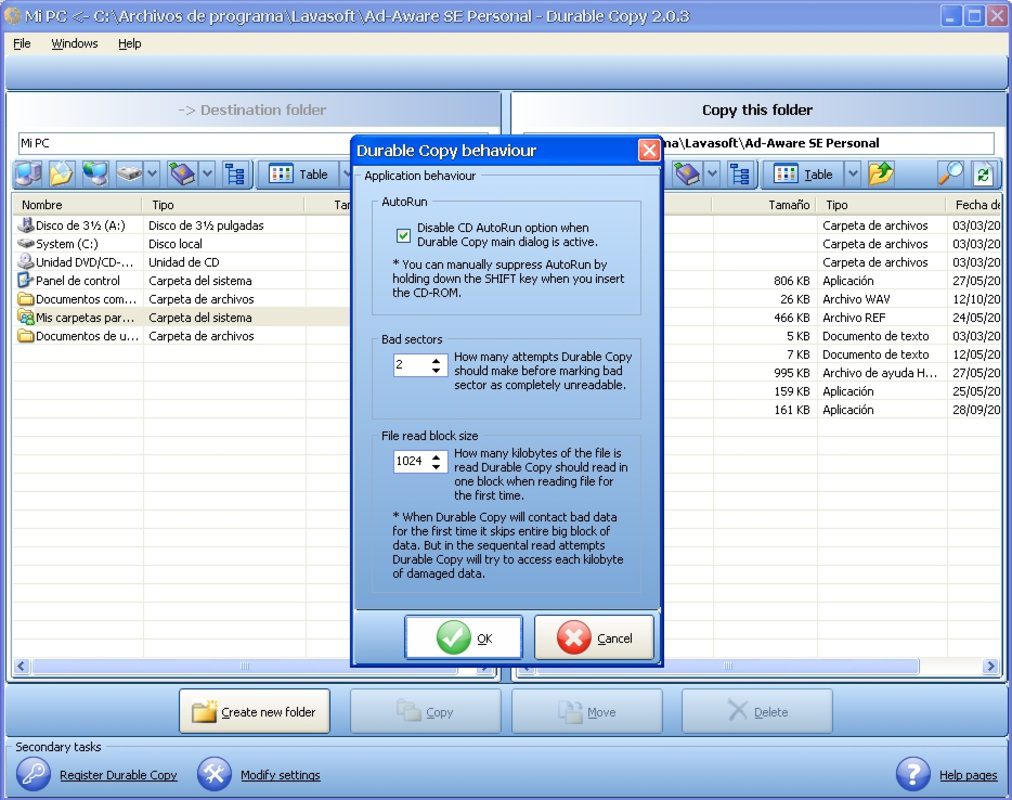
- Intuitive User Interface: Durable Copy features a layout inspired by FTP server environments, offering a familiar structure for users accustomed to file transfer systems. This design simplifies navigation through damaged drives, reducing the complexity typically associated with data recovery tools. Users can browse file hierarchies without requiring advanced technical knowledge.
- Efficient File Transfers: The app is engineered to transfer recoverable data from damaged drives with minimal disruption. It supports optimized read processes that prioritize intact file segments, enabling users to extract critical files even when the drive is partially inaccessible.
- Favorites Management: A dedicated favorites system allows users to save frequently accessed directories or recovery destinations. This feature streamlines the workflow by reducing repetitive navigation, which is especially useful when recovering multiple files from the same location.
- Data Recovery Focus: Unlike general file managers, Durable Copy is purpose-built for data recovery. It prioritizes salvaging usable files from physically compromised drives, making it a targeted solution for users facing irreversible drive failure.
For example, a user recovering family photos from a failing external hard drive can use the favorites feature to set a default save path, then navigate through the damaged drive’s structure using the FTP-like interface to locate and extract specific image folders. This workflow minimizes time and effort during a stressful recovery process.
Interface, UX & Performance
The user interface of Durable Copy is structured around a file browser model that mirrors FTP server layouts, offering a consistent experience for users familiar with network-based file access. The visual style emphasizes clarity and functionality, with a clean layout that prioritizes file listings, folder hierarchy, and navigation controls. This design supports quick orientation, even when dealing with fragmented or corrupted drive structures.
Navigational flow is linear and predictable, with back buttons, folder paths, and search functions enabling users to move through the drive’s contents without confusion. The app’s responsiveness appears to be optimized for handling partial data reads, which is essential when working with damaged hardware. Although the developer did not list formal performance metrics, the app’s focus on recovery efficiency suggests it is tuned for stability during extended read operations.
Performance across device categories is not explicitly detailed. However, the app’s design implies compatibility with a range of mobile devices, including tablets and smartphones, as long as they meet the minimum system requirements. Stability during prolonged recovery sessions is likely a core design consideration, given the high-stakes nature of data recovery. The absence of reported crashes or freezes in available documentation indicates a reliable runtime experience.
Platform Compatibility & Technical Requirements
Durable Copy is available for Android and iOS platforms, allowing users to access recovery tools on their preferred mobile devices. The app’s software version is not specified in the provided data, nor is the exact file size. Compatibility with specific operating system versions was not listed by the developer.
The developer did not specify minimum OS requirements, making it difficult to determine which devices are supported. Similarly, no information was provided about hardware prerequisites such as USB OTG support or external drive compatibility. Users are advised to verify their device’s capabilities before attempting to use the app with physical storage devices.
Although the app’s file size is not disclosed, its functionality suggests it may require sufficient storage space to cache or temporarily store recovered data. Users should ensure adequate free space on their device to accommodate both the app and recovered files.
Pros and Cons
Pros
- Specialized focus on data recovery from physically damaged drives
- Intuitive interface inspired by familiar FTP server layouts
- Efficient file transfer capabilities during recovery operations
- Favorites feature enhances workflow efficiency
- Mobile accessibility enables on-the-go recovery
Cons
- Specific technical requirements and OS compatibility were not disclosed
- File size and version details are not available
- No information on supported external drive types or connection methods
- Performance on low-end devices is unverified
- Limited visibility into update frequency or developer support
FAQ
Is Durable Copy safe to use for recovering sensitive data?
The app does not modify the original damaged drive during recovery, which reduces the risk of further data loss. However, users should ensure they are using a trusted device and avoid downloading the app from unofficial sources to maintain security.
Can I use Durable Copy with any type of external hard drive?
Specific drive compatibility was not listed. Users should verify if their external drive supports connection via USB OTG or other mobile-compatible interfaces before attempting recovery.
Does Durable Copy require root access or jailbreak?
There is no indication that root access or jailbreak is required. However, the developer did not provide confirmation on this point.
How often is Durable Copy updated?
The update schedule was not disclosed. Users are encouraged to check the official app store listing for the latest version and release notes.
Can I recover files from a completely dead drive?
Durable Copy is designed for drives with partial functionality. It may not work on drives that are entirely unresponsive or lack power delivery. Physical repair may be required before recovery attempts.
Final Thoughts + CTA
Durable Copy stands out as a focused, mobile-first solution for users facing the distress of data loss due to physical drive damage. Its FTP-inspired interface reduces the learning curve, while features like favorites and efficient file transfers enhance usability during critical recovery operations. Although technical details such as OS requirements, file size, and update frequency remain undisclosed, the app’s core functionality remains robust and purpose-driven.
It is most beneficial for individuals who need immediate access to recovery tools without relying on a desktop computer. Whether retrieving personal memories or vital work files, Durable Copy offers a practical and secure path to data salvage. Its mobile form factor adds a layer of convenience and accessibility, making it a valuable addition to any digital safety toolkit.
Download Durable Copy now
Guides & Tutorials
How to install Durable Copy
- Click the Download button above.
- Once redirected, accept the terms and click Install.
- Wait for the Durable Copy download to finish on your device.
How to use Durable Copy
This software is primarily used for its core features described above. Open the app after installation to explore its capabilities.
User Reviews
No reviews yet. Be the first to share your experience.
You may also like
more
Que no te pillen¡
About !Que no te pillen¡Reviewed by Jason A. BilbreyShow MoreShow Less

3D Combat Zone
About 3D Combat ZoneOriginally released in 1983, 3D Combat Zone immerses players...

666: El día del portal
About 666: El día del portalOn June 6, 2006, Agent P. Stone uncovers a sinister...

80 in 1 Best Flash games
About 80 in 1 Best Flash games 80 in 1 Best Flash games is a collection of 80 fl...

ABYSS SEEKERーーWhat Do You See Deep in The Abyss
About ABYSS SEEKERーーWhat Do You See Deep in The AbyssIn ABYSS SEEKER, players...

ACA NEOGEO THE KING OF FIGHTERS 2002 for Windows
About ACA NEOGEO THE KING OF FIGHTERS 2002 for WindowsTHE KING OF FIGHTERS 2002,...